Design Pattern | Singleton Pattern
What Is the Singleton Pattern?
- Singleton means a set that has only one element.
- The Singleton pattern guarantees that only one instance exists.
- The Singleton pattern is used when you want an instance to be created only once in a program.
- It is a pattern that creates only one object without using global variables and allows the created object to be referenced from anywhere.
- Configuration values used globally in a program also need the Singleton pattern to create only one object and share information.
- Examples include classes that represent system settings or window systems.
- In GoF design patterns, it is classified as a creational design pattern.
Singleton Pattern Example Program
This program creates a singleton instance.
Class Diagram
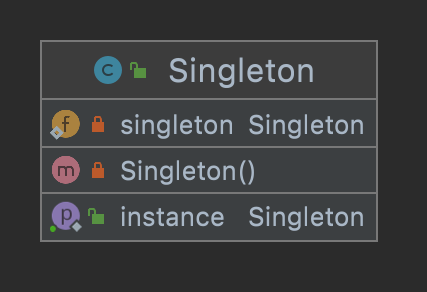
1. Singleton Class
This class returns the unique instance.
The constructor of the Singleton class is specified as private. This prevents the constructor from being called outside the Singleton class.
Singleton.java
package com.devkuma.designpattern.creational.singleton.ex1;

public class Singleton {

    private static Singleton singleton = new Singleton();

    private Singleton() {
        System.out.println("인스턴스를 생성하였습니다.");
    }

    public static Singleton getInstance() {
        return singleton;
    }
}
2. Main Class
This is the main class that executes the main processing.
Main.java
package com.devkuma.designpattern.creational.singleton.ex1;

public class Main {
    public static void main(String[] args) {
        Singleton obj1 = Singleton.getInstance();
        Singleton obj2 = Singleton.getInstance();
        if (obj1 == obj2) {
            System.out.println("obj1와 obj2는 동일한 인스턴스입니다.");
        } else {
            System.out.println("obj1와 obj2는 동일한 인스턴스가 아닙니다.");
        }
    }
}
3. Execution Result
인스턴스를 생성하였습니다.
obj1와 obj2는 동일한 인스턴스입니다.
Advantages of the Singleton Pattern
The Singleton pattern places a limit on the number of instances.
If multiple instances exist, they can affect each other and create unexpected bugs.
However, if there is a guarantee that only one instance exists, programming can be done based on that precondition.
Singleton Pattern Using synchronized
Example Program for Singleton Pattern Using synchronized
Because multiple objects can access it at the same time, declaring synchronized makes it thread-safe.
package com.devkuma.designpattern.creational.singleton.ex2;

public class SynchronizedSingleton1 {

    private static Singleton1 instance;

    /**
     * Inaccessible constructor
     */
    private SynchronizedSingleton1() {
    }

    public static synchronized Singleton1 getInstance() {
        if (instance == null) {
            instance = new Singleton1();
        }
        return instance;
    }

    public static void main(String[] args) {

        Singleton1 singleton1 = Singleton1.getInstance();
        Singleton1 singleton2 = Singleton1.getInstance();

        System.out.println(singleton1);
        System.out.println(singleton2);
    }
}
Example Program for a Singleton Pattern with Improved synchronized Performance
Because synchronization can cause performance issues, the code below improves performance by synchronizing only once at first.
volatile: a keyword that guarantees a variable works correctly at once in a threading environment.
package com.devkuma.designpattern.creational.singleton.ex2;

public class SynchronizedSingleton2 {

    private volatile static Singleton2 instance;

    /**
     * Inaccessible constructor
     */
    private SynchronizedSingleton2() {
    }

    public static Singleton2 getInstance() {
        if (instance == null) {
            // The instance is created only once at first.
            synchronized (Singleton2.class) {
                if (instance == null) {
                    instance = new Singleton2();
                }
            }
        }
        return instance;
    }

    public static void main(String[] args) {

        Singleton2 singleton1 = Singleton2.getInstance();
        Singleton2 singleton2 = Singleton2.getInstance();

        System.out.println(singleton1);
        System.out.println(singleton2);
    }
}