Design Pattern | Decorator Pattern
What Is the Decorator Pattern?
- The English word decorator means to decorate. It strongly implies adding something to existing content.
- The Decorator pattern is a way to keep adding decoration to an object.
- Using pizza as an example, think of adding toppings on top of an existing pizza.
- Just as sponge cake can be decorated with cream, chocolate, strawberries, and so on, objects can also be decorated by wrapping them with features one by one.
- In GoF design patterns, it is classified as a structural design pattern.
Decorator Pattern Example Program
This example program decorates an input string with borders and similar elements.
Class Diagram
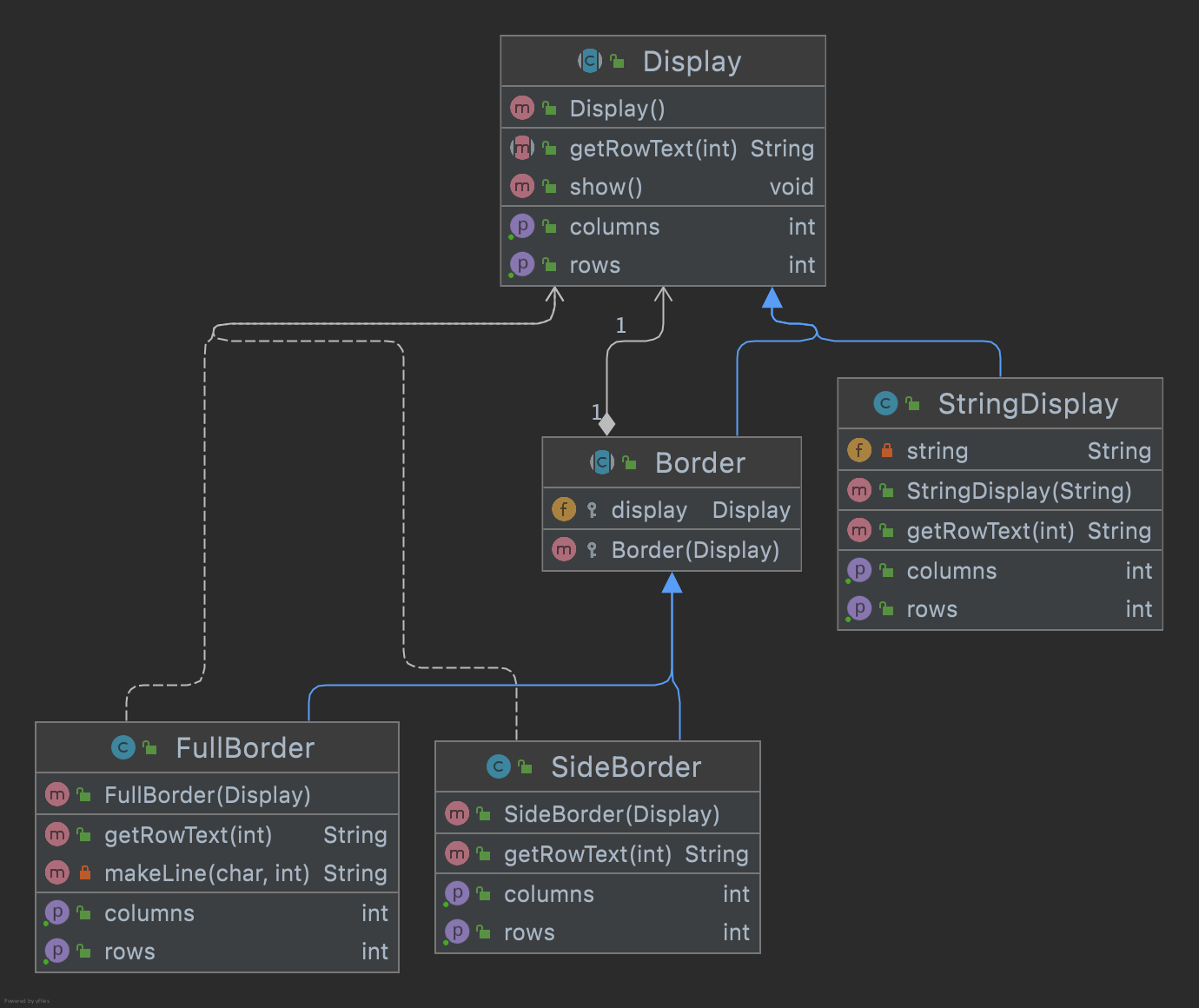
1. Display Class
This is an abstract class for displaying character lines.
Display.java
package com.devkuma.designpattern.structural.decorator;

public abstract class Display {

    // Return the number of characters in a column.
    public abstract int getColumns();

    // Return the number of rows.
    public abstract int getRows();

    // Return the string for the specified row.
    public abstract String getRowText(int row);

    public void show() {
        for (int i = 0; i < getRows(); i++) {
            System.out.println(getRowText(i));
        }
    }
}
2. StringDisplay Class
This class displays a character line consisting of only one row.
StringDisplay.java
package com.devkuma.designpattern.structural.decorator;

public class StringDisplay extends Display {

    private String string;

    public StringDisplay(String string) {
        this.string = string;
    }

    public int getColumns() {

        return string.getBytes().length;
    }

    public int getRows() {
        return 1;
    }

    public String getRowText(int row) {
        return (row == 0) ? string : null;
    }
}
3. Border Class
This abstract class represents a decorative border.
Border.java
package com.devkuma.designpattern.structural.decorator;

public abstract class Border extends Display {

    protected Display display;

    protected Border(Display display) {
        this.display = display;
    }
}
4. SideBorder Class
This class adds decorative borders on the left and right.
SideBorder.java
package com.devkuma.designpattern.structural.decorator;

public class SideBorder extends Border {

    public SideBorder(Display display) {
        super(display);
    }

    public int getColumns() {
        // The number of characters is the content plus decorative characters on both sides.
        return 1 + display.getColumns() + 1;
    }

    public int getRows() {
        // The number of rows is the same as the content.
        return display.getRows();
    }

    public String getRowText(int row) {
        return "*" + display.getRowText(row) + "*";
    }
}
5. FullBorder Class
This class adds decorative borders on the top, bottom, left, and right.
FullBorder.java
package com.devkuma.designpattern.structural.decorator;

public class FullBorder extends Border {

    public FullBorder(Display display) {
        super(display);
    }

    public int getColumns() {
        // The number of characters is the content plus decorative characters on both sides.
        return 1 + display.getColumns() + 1;
    }

    public int getRows() {
        // The number of rows is the content plus decorative rows above and below.
        return 1 + display.getRows() + 1;
    }

    public String getRowText(int row) {
        if (row == 0) {
            // Top border
            return "+" + makeLine('-', display.getColumns()) + "+";
        } else if (row == display.getRows() + 1) {
            // Bottom border
            return "+" + makeLine('-', display.getColumns()) + "+";
        } else {
            // Other rows
            return "|" + display.getRowText(row - 1) + "|";
        }
    }

    private String makeLine(char ch, int count) {
        StringBuffer buf = new StringBuffer();
        for (int i = 0; i < count; i++) {
            buf.append(ch);
        }
        return buf.toString();
    }
}
6. Main Class
This is the class that executes the main processing.
Main.java
package com.devkuma.designpattern.structural.decorator;

public class Main {

    public static void main(String[] args) {
        Display display1 = new StringDisplay("Hello world");
        display1.show();
        System.out.println("");

        Display display2 = new SideBorder(display1);
        display2.show();
        System.out.println("");

        Display display3 = new FullBorder(display2);
        display3.show();
        System.out.println("");

        Display display4 =
                new FullBorder(
                        new SideBorder(
                                new FullBorder(
                                        new StringDisplay("Hello world"))));
        display4.show();
    }
}
7. Execution Result
Hello world

*Hello world*

+-------------+
|*Hello world*|
+-------------+

+---------------+
|*+-----------+*|
|*|Hello world|*|
|*+-----------+*|
+---------------+
Advantages of the Decorator Pattern
In the Decorator pattern, both the decorative border(Border) and the content(StringDisplay) have a common interface. The interface is common, but the more you wrap, the more features are added. At that time, there is no need to modify the object being wrapped. Features can be added without changing what is wrapped.