Design Pattern | Proxy Pattern
What Is the Proxy Pattern?
- The English word proxy means agent or representative.
- It is a method that substitutes for an existing element.
- In object orientation, both “the object itself” and “the proxy” are objects.
- The Proxy pattern is a way for a proxy object to perform part of the work on behalf of an object that is too busy or cannot work directly.
- What matters in the Proxy pattern is that it should only control the flow and must not manipulate or change the result value.
- A proxy is used to access an object.
- In GoF design patterns, it is classified as a structural design pattern.
Proxy Pattern Example Program
This is an example program of a “named printer” that displays text on the screen.
Class Diagram
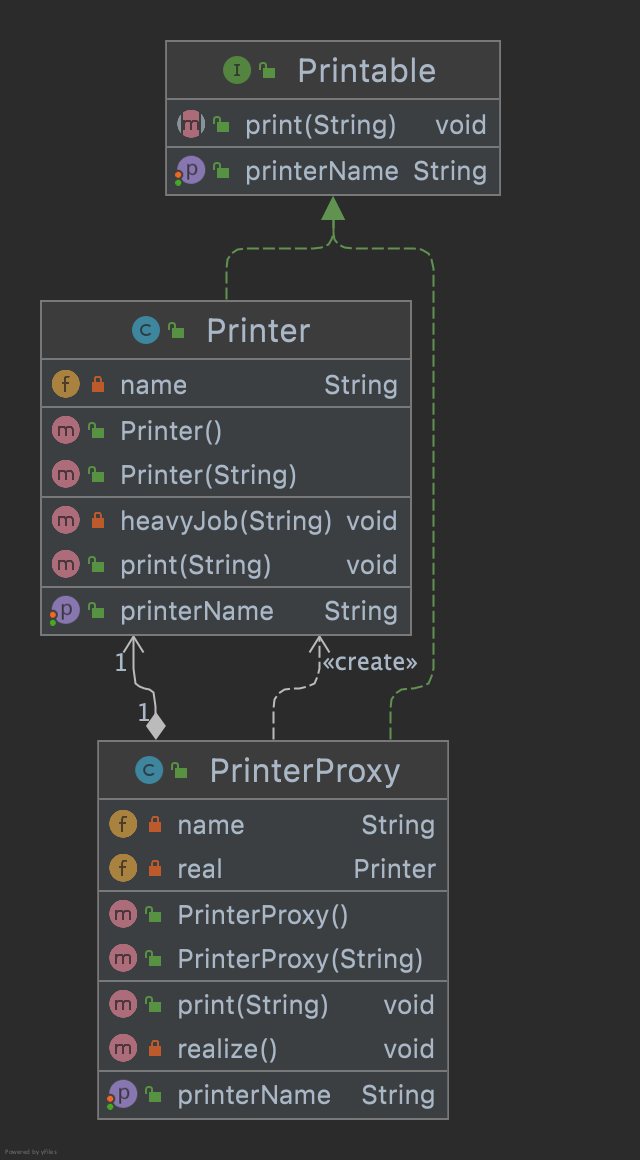
1. Printable Interface
This is the common interface for Printer and PrinterProxy.
Printable.java
package com.devkuma.designpattern.structural.proxy;

public interface Printable {
    // Set name
    void setPrinterName(String name);

    // Return name
    String getPrinterName();

    // Display string(print out)
    void print(String string);
}
2. Printer Class
This class represents a named printer. It is the real object.
Printer.java
package com.devkuma.designpattern.structural.proxy;

public class Printer implements Printable {

    private String name;

    public Printer() {
        heavyJob("Printer의 인스턴스를 생성중");
    }

    public Printer(String name) {
        this.name = name;
        heavyJob("Printer의 인스턴스 (" + name + ")를 생성중");
    }

    public void setPrinterName(String name) {
        this.name = name;
    }

    public String getPrinterName() {
        return name;
    }

    public void print(String string) {
        System.out.println("=== " + name + " ===");
        System.out.println(string);
    }

    private void heavyJob(String msg) {
        System.out.print(msg);
        for (int i = 0; i < 5; i++) {
            try {
                Thread.sleep(1000);
            } catch (InterruptedException e) {
            }
            System.out.print(".");
        }
        System.out.println("완료");
    }
}
3. PrinterProxy Class
This class represents a named printer proxy. It is the proxy.
PrinterProxy.java
package com.devkuma.designpattern.structural.proxy;

public class PrinterProxy implements Printable {

    private String name;
    private Printer real;

    public PrinterProxy() {
    }

    public PrinterProxy(String name) {
        this.name = name;
    }

    public synchronized void setPrinterName(String name) {
        if (real != null) {
            real.setPrinterName(name);
        }
        this.name = name;
    }

    public String getPrinterName() {
        return name;
    }

    public void print(String string) {
        realize();
        real.print(string);
    }

    private synchronized void realize() {
        if (real == null) {
            real = new Printer(name);
        }
    }
}
4. Main Class
This is the class that executes the main processing.
Main.java
package com.devkuma.designpattern.structural.proxy;

public class Main {
    public static void main(String[] args) {
        Printable p = new PrinterProxy("Alice");
        System.out.println("현재 이름은 " + p.getPrinterName() + " 입니다.");
        p.setPrinterName("Bob");
        System.out.println("현재 이름은 " + p.getPrinterName() + " 입니다.");
        p.print("Hello, world.");
    }
}
5. Execution Result
현재 이름은 Alice 입니다.
현재 이름은 Bob 입니다.
Printer의 인스턴스 (Bob)를 생성중.....완료
=== Bob ===
Hello, world.
Advantages of the Proxy Pattern
In the Proxy pattern, the Proxy becomes the representative and handles as much processing as possible in place of the real object.
In the example program, by using the Proxy role, heavy processing(instance creation) could be delayed until the moment print is actually called.
For example, in a system with many features that take time to initialize, if every feature is initialized at application startup, including features not used at startup, application startup will take longer.
The lazy behavior could be placed inside the Printer class from the beginning without splitting it into PrinterProxy and Printer. However, by separating the classes, the program becomes more componentized and individual features can be added more easily.