Network Overview
What Is a Network?
A network generally means “connecting people or things like a net.” In the world of IT systems, it means “interconnecting computers.” It may also be described as “a path through which information flows.” By connecting computers through communication circuits, cables, and similar media, it becomes possible to share information, distribute processing, and exchange messages.
The word network is a compound of Net + Work. If translated literally, it means “net work,” and in a more understandable way, it can be described as “work performed cooperatively while being connected to one another like a net.” Going further, it can be described as “work in which computers share resources while connected to one another.”
Then what is the Internet? It is a huge integrated communication network that connects networks around the world through a set of communication rules, the TCP/IP protocol.
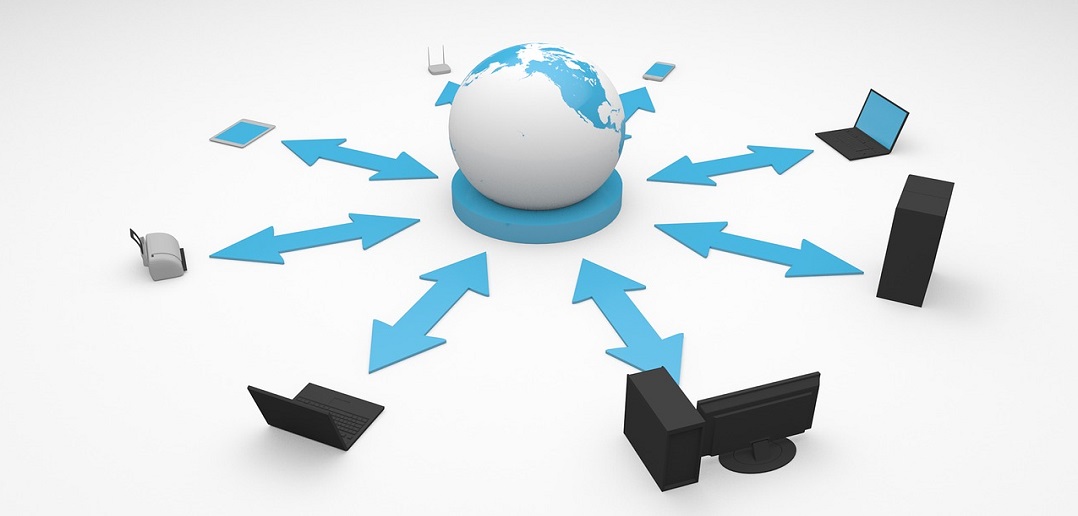
Components of a Network
A network consists of “computers,” “network devices,” “transport media,” and similar elements. Computers are PCs, servers, and other machines that provide or use applications (services). Network devices, such as switches and routers, transport application data. Transport media, such as cables and wireless radio waves, connect computers and network devices.
Network Topology
Network topology refers to the physical connection form of various networks. It describes the overall shape of computers connected by cables in a network.
- Physical structure: the actual connection shape of hosts connected by media.
- Logical structure: the network shape based on how hosts access the media.
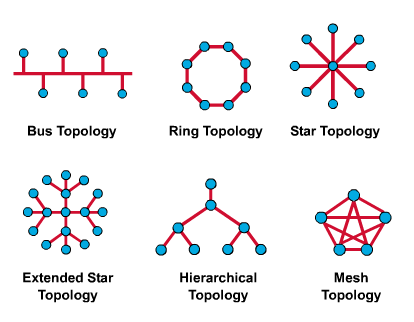
There are six forms of physical topology.
Bus Topology
Bus topology is a form in which each node is connected to a common line called a bus. All devices are connected to a central cable called a backbone. The Ethernet protocol also uses this form.
- Advantages
- Nodes can be added and removed easily, and a failure in a specific node does not affect other nodes.
- It is inexpensive.
- Disadvantages
- Because the bandwidth of the common line is shared, as the number of nodes increases, traffic on the line increases and network performance decreases.
- To expand it, the entire network must be stopped, and if a cable problem occurs, it is difficult to find.
Star Topology
As it looks, this topology is shaped like a star. Each node is connected to the center within 100 meters. Each node has input and output through only one link.
- Advantages
- Failures are easy to find, and management is easy.
- Even if a node has a problem, the entire network is not affected.
- Expansion is very easy because you only need to connect to the center.
- Disadvantages
- If the main node fails, the entire network becomes unavailable.
- Although management is easy, all transmission must pass through the center, so bottlenecks may occur.
Ring Topology
Ring topology is a circular topology in which each node is connected to its neighboring nodes on the left and right. Each node is directly connected to the device next to it. Data can be transmitted in only one direction. Token Ring also uses this form.
- Advantages
- Because communication is one-way, signal amplification is possible and there are fewer distance limitations.
- It is easy to install over a wide area and has the advantage of being able to use wide bandwidth.
- Disadvantages
- Adding and removing nodes is not easy.
- Installation cost is high. (It decreases if the space is small.)
Mesh Topology
Mesh topology is a form in which everything is connected to everything else. It is a net-like form where all nodes are connected one-to-one, allowing multiple pairs of nodes to communicate at the same time.
There are fully connected and partially connected forms. A fully connected network does not require switching or broadcasting, but the number of connections increases rapidly each time a node is added.
The number of connections required for n nodes is n(n-1)/2.
-
Advantages
- A failure in a specific node does not affect other nodes, and line failures can be handled flexibly.
- It also provides the strongest security.
-
Disadvantages
- Line construction costs are high, and adding a new node creates an additional cost burden.
- Installation and readjustment are difficult.
Communication Methods
Broadcast, unicast, and multicast are all communication methods.
- Broadcast: sends a transmission message to an entire network.
- Unicast: a one-to-one communication method.
- Multicast: sends data only to selected recipients.
ISP (Internet Service Provider)
- An Internet service provider.
- For example, providers such as KT, U+, and SK Broadband.