DNS Server
What Is DNS (Domain Name System)?
DNS stands for Domain Name System. It is a system that manages a mapping table between “IP addresses,” which are Internet addresses that computers can easily understand, and “domains,” which are Internet addresses that people can easily understand.
For example, DNS converts a human-readable domain name such as www.devkuma.com into a computer-readable IP address such as 185.199.109.153.
DNS Server
A DNS server is a server that implements name resolution. Domain name resolution is a system that manages and converts the mapping table between “IP addresses” and “domains,” which are addresses on the Internet.
A computer that provides a service or function is called a “server,” and a computer that uses that service or function is called a “client.”
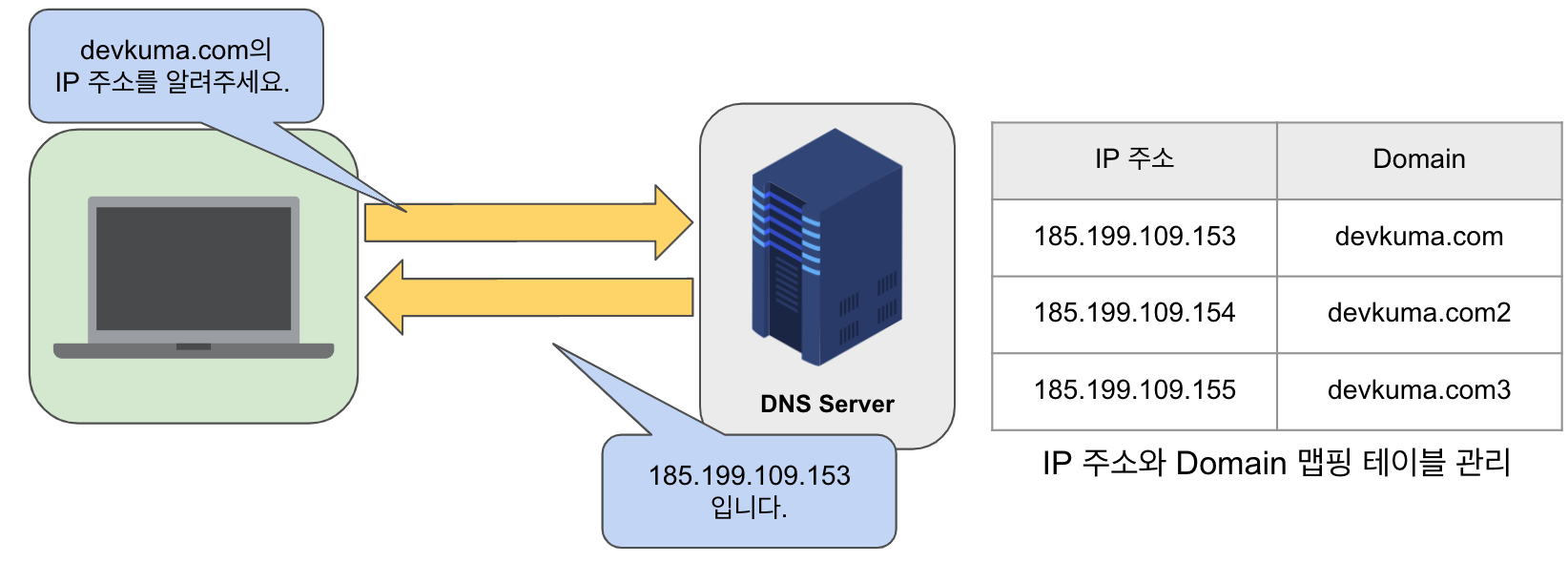
A DNS server is a server that implements the function of converting a “domain” into an “IP address” or an “IP address” into a “domain” (name resolution).
Why Is a DNS Server Necessary?
To communicate on the Internet, an Internet address called an “IP address” is required.
Therefore, when browsing a website or sending email, something easy for people to understand, called a “domain,” must be converted into an “IP address.”
For example, the URL of this site is “https://devkuma.com.” The domain name is “devkuma.com.” To view this site, communication is performed by converting the domain “devkuma.com” into an “IP address.”
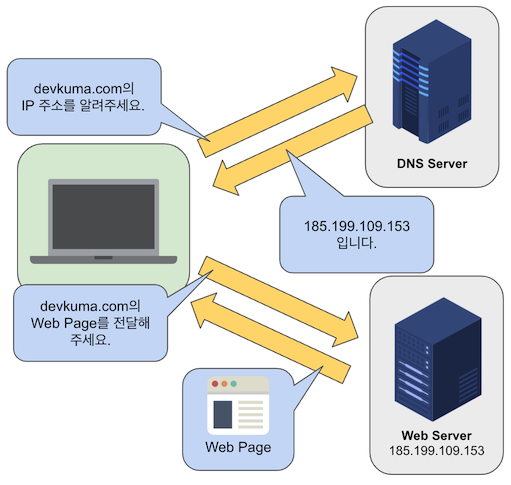
The same applies when you want to send mail to the destination mail address “kimkc@devkuma.com.” The part after “@” is the domain “devkuma.com,” and communication is performed by converting that domain into an “IP address.”
If the value is converted anyway, you might think that “domains” are unnecessary from the beginning. However, without domains, addresses would be written as below, making it difficult to understand what site they refer to.
https://185.199.109.153.com
https://127.0.0.1.net
https://192.168.10.1.co.kr
The purpose of DNS is to make addresses easier to read by representing them with characters instead of IP address numbers.
How DNS Servers Work
There are many kinds of DNS servers. The first server a user’s computer queries is a “DNS cache server.”
A “DNS cache server” stores query results for a certain period. If the same request arrives within that period, it responds by itself without newly requesting an external DNS server.
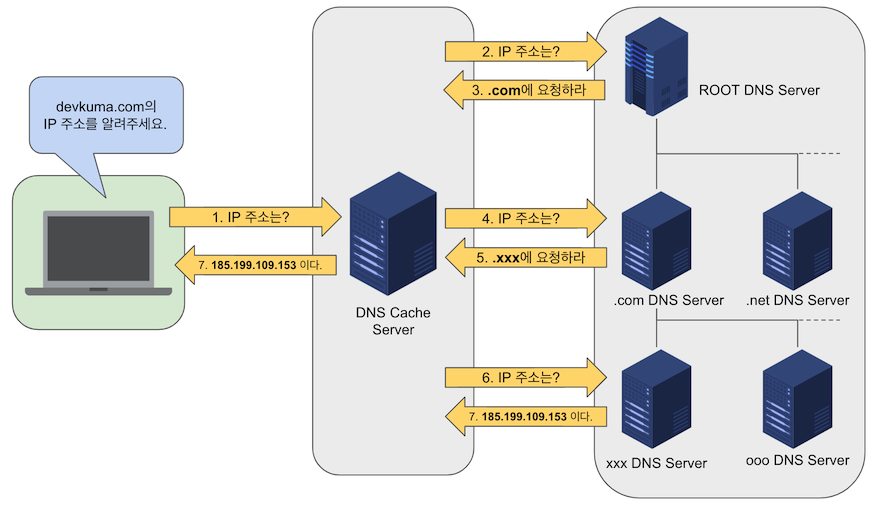
At the top of the hierarchical DNS servers (three layers in this example) is the “root server.” The “root server” manages the IP addresses of DNS servers for top-level domains such as “kr,” “com,” and “net.”
Below the top-level domain DNS servers, it manages the IP addresses of DNS servers that manage domains such as “xx.com.” Finally, the flow is to obtain the IP address from the DNS server for “xx.com” that manages the IP address of “devkuma.com.”
In this way, DNS does not manage everything with a single server. Instead, it distributes management by arranging servers hierarchically and managing the mapping between “domain names” and “IP addresses.”
Domain Name System Organizations
Domain names are usually written in the order “host.server domain (organization name).subdomain (organization type).top-level domain.” For example, the Blue House domain is “www.president.go.kr.”
Top-level domains represent organizations or countries by abbreviation. In the case of the United States, the country name is often omitted and domains frequently end with one of the domains in the left side of the table below. For example, the White House domain name is “www.whitehouse.gov.”
Types of Top-Level Domains
| Domain | Organization | Domain | Country |
|---|---|---|---|
| edu | Educational institution | kr | Korea, South |
| com | Company/business | jp | Japan |
| gov | Government agency | cn | China |
| int | International organization | ca | Canada |
| org | Nonprofit public organization | de | Germany |
| net | Network-related organization | uk | United Kingdom |
| mil | U.S. Department of Defense-related organization | fr | France |
Learn more about country code top-level domains
A subdomain is the area between the top-level domain and the host name. As shown in the table below, it represents the organization’s name and type. Subdomains that indicate the organization’s type include ac, re, co, go, and ne, representing schools, research institutes, companies, government agencies, and network-related organizations, respectively.
Types of Subdomains
| Subdomain | Organization | Domain | Example |
|---|---|---|---|
| ac | Academy | Educational/academic institution | https://www.snu.ac.kr |
| re | Research | Research institute | https://etri.re.kr |
| co | Company | Company | https://samsung.co.kr/ |
| go | Government | Government agency | http://www.president.go.kr/ |
| ne | Nonprofit public organization | Network or gateway |
DNS Records
A DNS record (or zone file) is an instruction on an authoritative DNS server that provides information about the IP address associated with a domain and how requests for that domain should be handled. These records consist of a set of text files called DNS syntax. DNS syntax is a string used as a command that tells the DNS server what work to perform. Also, every DNS record has a “TTL,” which stands for time-to-live and indicates how often DNS servers refresh that record.
A
- An IPv4 address record is used to map a host name to an IPv4 address.
AAAA
- An IPv6 address record is used to map a host name to an IPv6 address.
CNAME
- A canonical name record is an alias that points to another DNS record.
NS
- A name server record points to an authoritative name server.
SOA
- A start of authority record contains authoritative information about a DNS zone.
MX
- Sends email to an email server.
TXT
- A text record contains arbitrary text.
- Administrators can store text notes in the record.
- This record is often used for email security.