IP Address
IP Address
An IP address is the address of a computer on the Internet. Every device connected to the Internet must be assigned an IP address.
How Is Data Transmitted on the Internet?
For example, when you “send mail,” “send a message through a messenger,” or “buy a product from an online store,” how is data sent and received?
In fact, it is similar to sending a parcel.
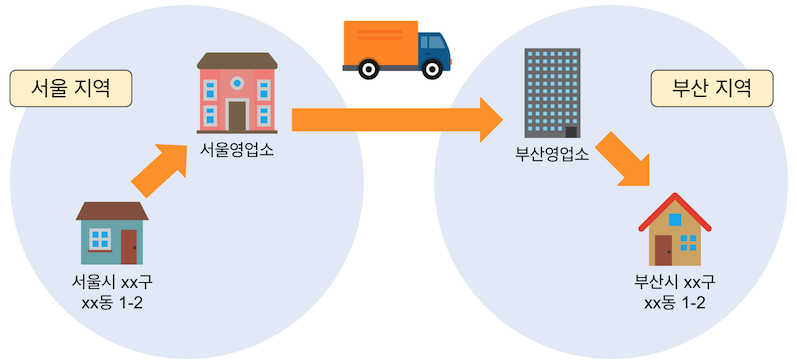
For a parcel to arrive safely, information about the “sender address” and “recipient address” is required.
Flow of parcel delivery:
- First, it is gathered at the office closest to the “sender address.” (In the figure above, the Seoul office)
- Next, the “recipient address” is checked, and the parcel is sent to the office closest to that address. (In the figure above, the Busan office)
- Finally, it arrives at the “recipient address” from the office.
Now let’s look at how data is sent and received on the Internet.
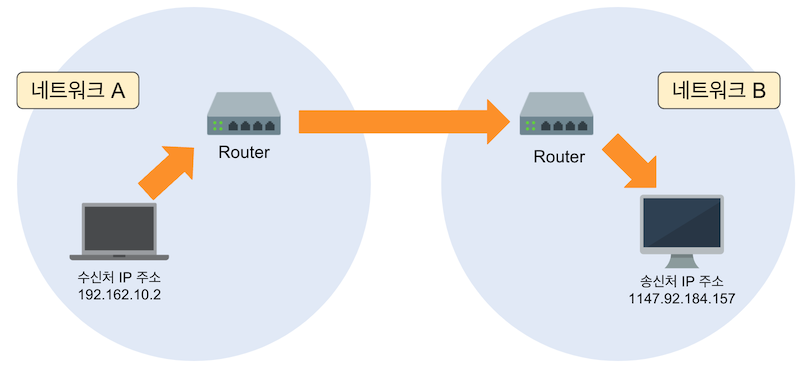
To deliver a parcel to another person, the “sender address” and the “destination address” were required.
In a network, these addresses correspond to “IP addresses.” For a computer (network device) to connect to a network, it must be assigned a unique IP address that does not overlap with others.
The flow of data transmission and reception by a computer (network device) is as follows.
- First, data is sent to a network device called a router near the “source IP address” (a role similar to a parcel office).
- Then the router checks the “destination IP address” and sends the data to a router near the “destination IP address.”
- Finally, the data is delivered from the router to the computer (network device) assigned the “source IP address.”
In this way, the structure of data transmission and reception on the Internet is almost the same as parcel delivery. Work that people perform is automatically performed by using network devices (routers).
How IP Addresses Work
Who Manages IP Addresses?
An IP address is the address of a computer (network device) on the Internet. Therefore, IP addresses are assigned so that they do not overlap.
The organization that manages “IP addresses,” which are indispensable for communication on the Internet, is a nonprofit corporation called ICANN (The Internet Corporation for Assigned Names and Numbers).
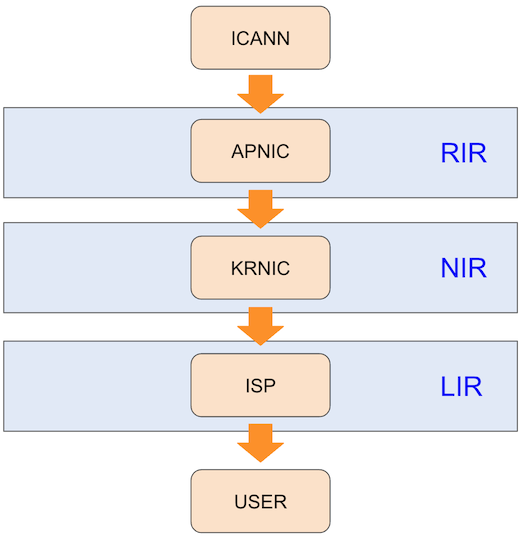
However, ICANN does not manage all information in the world directly. Under ICANN are RIRs (Regional Internet Registries) that manage resources by region such as North America, Asia, and Europe. Under them are NIRs (National Internet Registries) that manage resources by country, and finally LIRs (Local Internet Registries) such as Internet service providers (ISPs).
Difference Between Private IP Addresses and Public IP Addresses
There are two types of IP addresses: “private IP addresses” and “public IP addresses.”
A public IP address is an IP address required to connect to the Internet, while a private IP address is used only inside an organization’s network (private network), such as a home or company.
Private IP Address
A private IP address is an IP address used in an organization’s network (private network), such as a home or company. Addresses are assigned so they do not overlap within the organization.
The following is an example of private IP addresses.
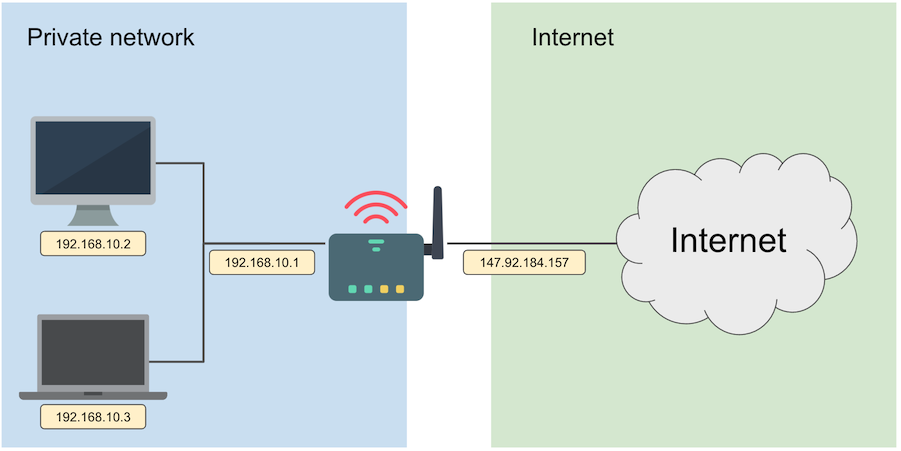
In the figure above, the left side is the “private network,” the right side is the “Internet,” and there is a broadband router between the “private network” and the “Internet.” This is a common configuration when using an Internet service provider (ISP).
Computers in the private network are assigned private IP addresses.
Using private IP addresses, computers can communicate with other computers inside the private network.
However, to communicate with computers outside the private network, a public IP address is required.
Private IP addresses cannot communicate on the Internet.
Public IP Address
A public IP address is an Internet address required for computers and communication devices to communicate over the Internet.
Therefore, a router (broadband router) connects to the Internet by converting private IP addresses into public IP addresses. The method of converting between private IP addresses and public IP addresses is called NAT (Network Address Translation).
Why Are Private IP Addresses Necessary?
Private IP addresses appeared because of the IPv4 “IP address exhaustion problem.” IP address exhaustion is the problem of not having enough IP addresses.
An IP address is an address for communicating on the Internet. Therefore, an IP address must be unique and must not overlap.
Based on the idea that not every computer needs to access the Internet, a mechanism was created to assign a specific range of IP addresses inside an organization as private IP addresses.
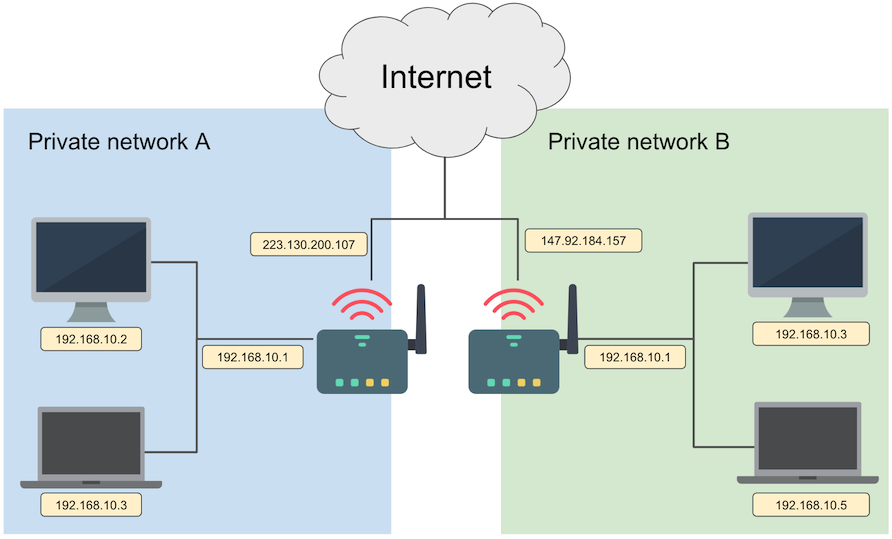
Unlike global IP addresses, which must be assigned so they do not overlap anywhere in the world, private IP addresses only need to be unique within an organization (private network).
In the figure above, computers in “private network A” and “private network B” are assigned the same private IP address, but this is not a problem because the organizations (private networks) are different.
Therefore, private IP addresses are a mechanism for conserving IP addresses.
Private IP addresses also have security advantages. To communicate on the Internet, traffic must pass through a router (broadband router, default gateway). Because this router has security functions, security can be strengthened through the router.
IP Address Definition
Classful Method
An IP address consists of two parts: a network part and a host part.
The network part indicates which network it belongs to, and the host part is the address assigned to a host in that network.

Traditional IP addresses used the “classful method,” so the network part and host part were fixed.
| Class | Address range | Network part range | Host part range | Number of assignable hosts |
|---|---|---|---|---|
| Class A | 0.0.0.0 ~ 127.255.255.255 | First 8 bits | 24 bits | 16,777,214 |
| Class B | 128.0.0.0 ~ 191.255.255.255 | First 16 bits | 16 bits | 65,534 |
| Class C | 192.0.0.0 ~ 223.255.255.255 | First 24 bits | 8 bits | 254 |
Because of this structure, for example, if a company that needs 100 IP addresses uses “Class C,” Class C provides 254 assignable hosts, so 154 IP addresses are wasted after excluding the required 100 addresses (254 - 100 = 154).
This led to the “classless method.” In the classless method, a subnet mask is used to make it possible to freely change the boundary between the “network part” and the “host part.”
Classless Method
The classless method is a method that uses a subnet mask to make it possible to freely change the boundary between the “network part” and the “host part.”
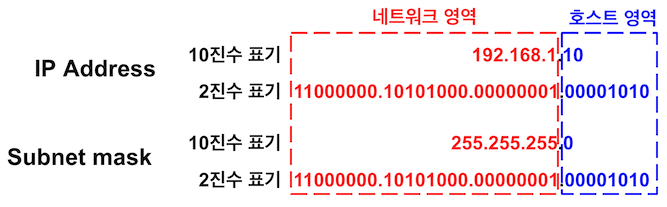
A subnet mask is written in decimal as “255.255.255.0,” as in the example above, and in binary as “1” and “0.”
The parts of the subnet mask that are “1” are the “network part,” and the parts that are “0” are the host part.
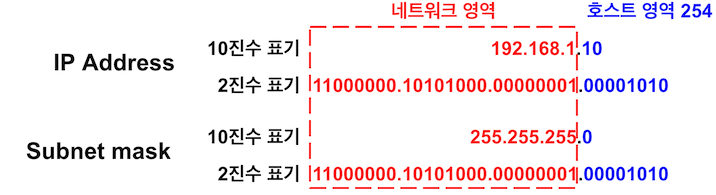
For example, suppose a company that needs 100 IP addresses is assigned the Class C network “192.168.1.0,” as before. (The subnet mask is 255.255.255.0.)
In this case, 254 IP addresses can be used by computers (192.168.1.1 ~ 192.168.1.254).
As a result, 154 IP addresses are wasted (254 - 100 = 154).
Now move the boundary between the “network part” and the “host part” one position to the right.
Then the subnet mask changes from “255.255.255.0” to “255.255.255.128.” In this case, 126 IP addresses can be used by computers (192.168.1.1 ~ 192.168.1.126).
As a result, only 26 IP addresses are wasted (126 - 100 = 26). If you consider them spare addresses, this is not really waste.
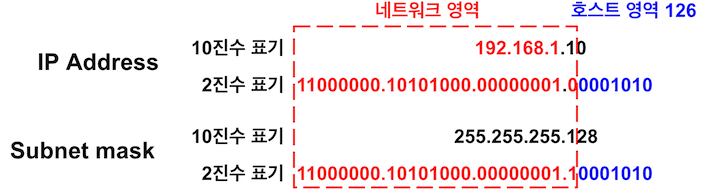
In this way, the “classless method” uses a subnet mask to freely change the boundary between the “network part” and the “host part” and adjust the number of IP addresses assigned to hosts.
Difference Between IPv4 and IPv6
The major versions of IP addresses are IPv4 and IPv6. IPv6 appeared because IPv4, the major IP address version, has an “IP address exhaustion problem.”
IPv4 provides about 2 to the 32nd power usable IP addresses (about 4.3 billion = 4.3 x 10^9), while IPv6 provides about 2 to the 128th power usable IP addresses (about 340 undecillion = 3.4 x 10^38).
IPv6 addresses are expressed in 128 bits, separated by colons (:) every 16 bits, and written in hexadecimal.
An example IPv6 notation is as follows.
201a:30b8:cd01:0132:2f8a:1f30:1c02:10aa
How to Check an IP Address
Checking an IP Address on Windows
To check your IP address on Windows, start Command Prompt and use the ipconfig command.
C:\>ipconfig

Windows IP Configuration


Ethernet adapter vEthernet (Default Switch):

   Connection-specific DNS Suffix  . :
   Link-local IPv6 Address . . . . . : fe80::1a8:2f:14f:e65b%42
   IPv4 Address. . . . . . . . . . . : 172.25.32.1
   Subnet Mask . . . . . . . . . . . : 255.255.240.0
   Default Gateway . . . . . . . . . :

Wireless LAN adapter Local Area Connection* 9:

   Media State . . . . . . . . . . . : Media disconnected
   Connection-specific DNS Suffix  . :

Wireless LAN adapter Local Area Connection* 10:

   Media State . . . . . . . . . . . : Media disconnected
   Connection-specific DNS Suffix  . :

Wireless LAN adapter Wi-Fi:

   Connection-specific DNS Suffix  . :
   Link-local IPv6 Address . . . . . : fe80::6107:be9e:21cc:5dd8%14
   IPv4 Address. . . . . . . . . . . : 192.168.0.11 ----------> "192.168.0.11" is the IP address.
   Subnet Mask . . . . . . . . . . . : 255.255.255.0
   Default Gateway . . . . . . . . . : 192.168.0.1

Ethernet adapter Bluetooth Network Connection:

   Media State . . . . . . . . . . . : Media disconnected
   Connection-specific DNS Suffix  . :
When connecting to the Internet through a broadband router or similar device, most IP addresses displayed by the ipconfig command are “private IP addresses.”
If you are not using a broadband router or similar device, a “public IP address” is displayed.
Checking an IP Address on macOS
On macOS, you can check it with the terminal command ifconfig | grep inet.
% ifconfig | grep inet
	inet 127.0.0.1 netmask 0xff000000
	inet6 ::1 prefixlen 128
	inet6 fe80::1%lo0 prefixlen 64 scopeid 0x1
	inet6 fe80::a08e:1eff:fe6e:5cd7%anpi1 prefixlen 64 scopeid 0x4
	inet6 fe80::a08e:1eff:fe6e:5cd9%anpi3 prefixlen 64 scopeid 0x5
	inet6 fe80::a08e:1eff:fe6e:5cd8%anpi2 prefixlen 64 scopeid 0x6
	inet6 fe80::a08e:1eff:fe6e:5cd6%anpi0 prefixlen 64 scopeid 0x7
	inet6 fe80::bc76:eff:fe35:99b8%ap1 prefixlen 64 scopeid 0x10
	inet 192.168.0.3 netmask 0xffffff00 broadcast 192.168.0.255 ----------> "192.168.0.3" is the IP address.
	inet6 fe80::c4a:ec1f:c825:f3ff%en1 prefixlen 64 secured scopeid 0x11
	inet6 fe80::349c:a6ff:fe51:afdd%awdl0 prefixlen 64 scopeid 0x14
	inet6 fe80::349c:a6ff:fe51:afdd%llw0 prefixlen 64 scopeid 0x15
	inet6 fe80::9e50:c1a4:1b3c:b91%utun0 prefixlen 64 scopeid 0x16
	inet6 fe80::1d5b:41a9:12e2:c38e%utun1 prefixlen 64 scopeid 0x17
	inet6 fe80::ce81:b1c:bd2c:69e%utun2 prefixlen 64 scopeid 0x18