Ollama
What Is Ollama?
Ollama is a tool widely used recently among AI and LLM developers.
Ollama is an open source platform that makes it easy to run and manage large language models (LLMs) in a local environment.
In other words, without using a cloud model such as the OpenAI API, it lets you load and use models such as Llama, Mistral, Gemma, and CodeLlama on your own PC (Mac/Linux/Windows).
Main Features of Ollama
- Local execution support
- Models can run even without an internet connection
- Useful for corporate security and personal privacy
- Simple model deployment
- Run a model with a single command such as
ollama run llama3 - Supports model package management like Docker, managed with a configuration file called
Modelfile
- Run a model with a single command such as
- Support for multiple models
- Can download and run many models such as Meta LLaMA, Mistral, Gemma, Code Llama, and Phi
- API support
- Opens a local server in REST API format (
http://localhost:11434/api/generate) so other apps can call it - Can be used like a local OpenAI API server
- Opens a local server in REST API format (
- GPU optimization
- Supports MPS (Mac) and CUDA (NVIDIA GPU), making it fast
- Can also run on CPU, but more slowly
Using Ollama
Installation
- Packages are provided for macOS, Linux, and Windows
- macOS
brew install ollama
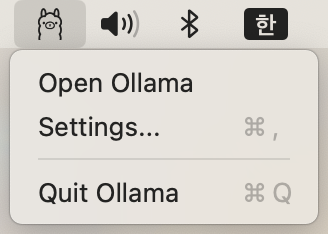
After installation on macOS, running Ollama displays an Ollama icon in the menu bar.
Running a Model
ollama run llama3
On first execution, the model is automatically downloaded and then run. The llama3 model is 4.7 GB.
Downloading Models
Search for models on the official site and install the model you want to use.
- Recommended models
- https://www.ollama.com/library/gpt-oss
- Use this if you want ChatGPT-level chat, analysis, or work support. It is a little slow on a MacBook, but works well.
- https://www.ollama.com/library/phi4-mini
- Suitable for simple tasks such as searching for targets to call from an MCP server. Any lightweight model that supports tools is fine. Do not use qwen or deepseek.
- https://www.ollama.com/library/gpt-oss
API Call (for example, curl)
curl http://localhost:11434/api/generate -d '{
  "model": "llama3",
  "prompt": "Explain quantum computing in simple terms"
}'
Model Management
ollama list-> Check installed modelsollama pull mistral-> Download a new modelollama create mymodel -f Modelfile-> Create a custom model
Comparing Ollama with Other LLM Execution Frameworks
| Tool | Features |
|---|---|
| Ollama | Simplest installation and execution, local API support, model package management |
| LM Studio | GUI-based, intuitive model selection and execution |
| vLLM | Optimized for high-performance server execution, mainly used for large-scale deployments |
| Text Generation WebUI | Runs various models and provides a Web UI |
| OpenAI API | Cloud-based and can use the latest models, but has cost and privacy issues |
Use Cases
- Building a local AI assistant in a development environment
- Building an internal chatbot connected to secure company data
- Building RAG systems by integrating with frameworks such as LangChain and LlamaIndex
- Prototyping: Experimenting quickly without using OpenAI API costs
Summary
Ollama is a platform like “Docker for LLMs” that makes it easy to run LLMs locally. It can be used for many purposes, from personal research to enterprise chatbots.