MCP Function Calling with the Google Gemini API
Learn how to connect an MCP Server to an LLM (Gemini).
How Function Calling Works
The details of how function calling works are explained in the official Gemini API documentation.
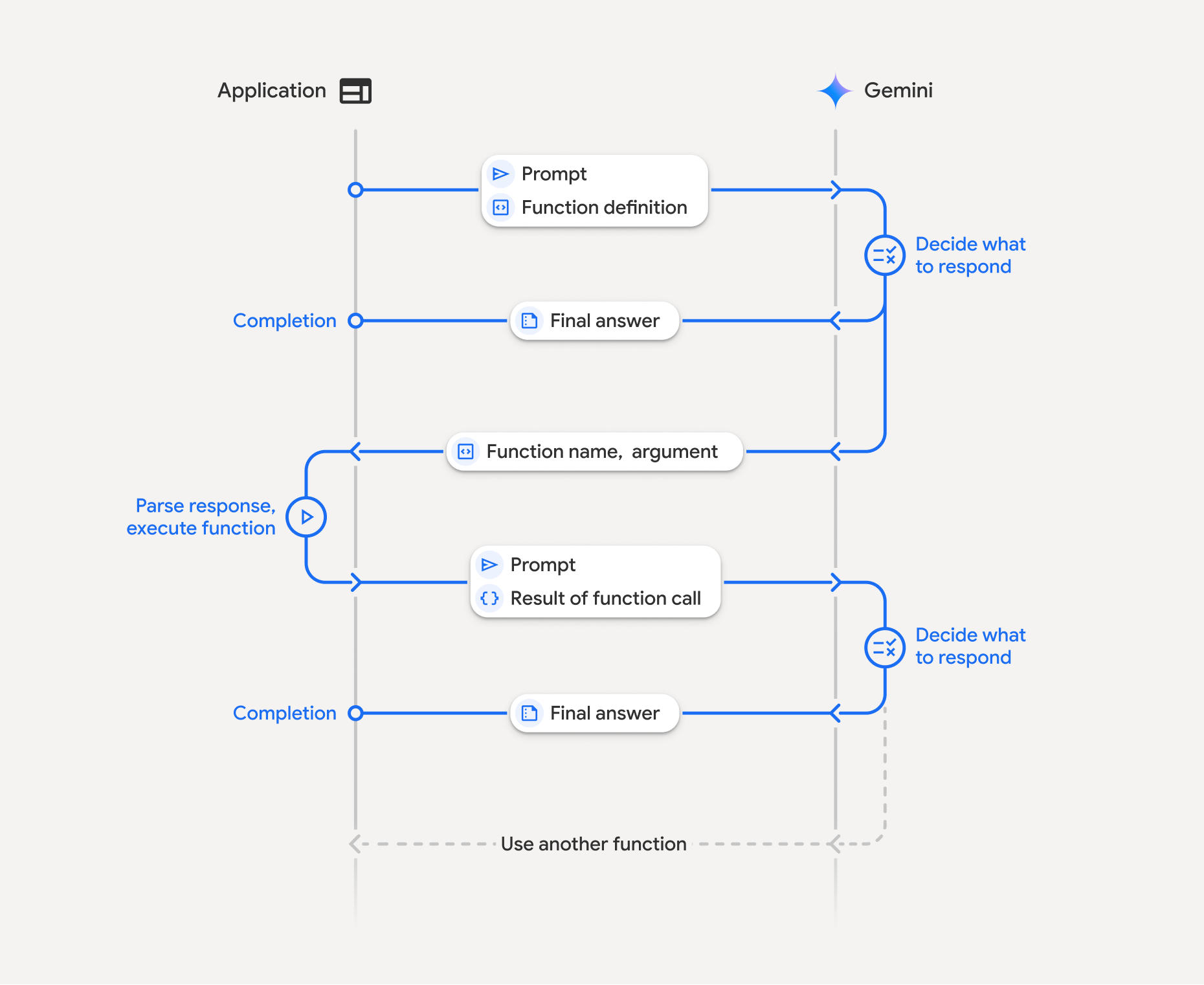
In brief:
- Function calling is a structured collaboration method among an application, an LLM, and external functions.
- The application first defines function declarations to describe the function name, parameters, and purpose to the model.
- When the user prompt and function declarations are passed to the LLM, the model decides whether a function call is needed and returns a structured JSON response or a regular text response.
- Function execution is the responsibility of the application, not the model. The model only provides the function name and arguments.
- When the execution result is sent back to the model, the model reflects it and generates a user-friendly final answer.
Preparing the MCP Server
We will use the simple server described in the following document.
Adding Authentication to a WebMVC MCP Server Built with Spring and Kotlin
Client Development
The client will use the application created in the following document.
Building an Application with the Gemini API
package com.devkuma.sample1

import com.google.genai.Client
import com.google.genai.types.*
import io.modelcontextprotocol.client.McpClient
import io.modelcontextprotocol.client.transport.HttpClientStreamableHttpTransport
import io.modelcontextprotocol.spec.McpSchema.CallToolRequest
import java.net.http.HttpRequest
import java.util.stream.Collectors


fun main() {
    // Configuration
    val mcpServerUrl = "http://localhost:8080"
    val mcpApiKey = "api01.mycustomapikey"
    val geminiApiKey = "GEMINI_API_KEY"

    println("========================================")
    println("Gemini API + MCP Function Calling Demo")
    println("========================================\n")

    // 1. Initialize MCP client
    val request = HttpRequest.newBuilder()
        .header("Content-Type", "application/json")
        .header("X-API-key", mcpApiKey)

    val transport = HttpClientStreamableHttpTransport.builder(mcpServerUrl)
        .requestBuilder(request)
        .build()

    val mcpClient = McpClient.sync(transport)
        .build()
    mcpClient.initialize()
    mcpClient.ping()

    // Fetch the list of tools available from the MCP server.
    val toolsList = mcpClient.listTools()
    println("Available Tools = $toolsList")


    // 2. Initialize Gemini client and configure functions
    val functionDeclarations = toolsList.tools().stream()
        .map({ t ->
            FunctionDeclaration.builder()
                .name(t.name()) // MCP tool name
                .description(t.description()) // MCP tool description
                .parametersJsonSchema(t.inputSchema()) // Receive as Object type
                .build()
        })
        .collect(Collectors.toList())

    val tool: Tool = Tool.builder()
        .functionDeclarations(functionDeclarations)
        .build()

    val config = GenerateContentConfig.builder()
        .tools(listOf(tool))
        .build()

    val client = Client.builder().apiKey(geminiApiKey).build()

    // 4. Process user question
    val userMessage = "Tell me the weather in Seoul"
    println("\n========================================")
    println("User: $userMessage")
    println("========================================\n")


    // 5. First Gemini API call
    var response = client.models.generateContent(
        "gemini-3-flash-preview",
        userMessage,
        config
    )

    println("\n=== First Response ===")
    println("Candidates: ${response.candidates()}")

    // 6. Check and process Function Call
    val candidatesOpt = response.candidates()
    if (candidatesOpt.isPresent) {
        val candidates = candidatesOpt.get()
        if (candidates.isNotEmpty()) {
            val candidate = candidates[0]
            val contentOpt = candidate.content()

            if (contentOpt.isPresent) {
                val content = contentOpt.get()
                val partsOpt = content.parts()

                if (partsOpt.isPresent) {
                    val parts = partsOpt.get()
                    println("Parts: $parts")

                    // Check whether there is a Function Call
                    val functionCalls = parts.filter { p: Part ->
                        p.functionCall() != null && p.functionCall().isPresent
                    }

                    if (functionCalls.isNotEmpty()) {
                        println("\n=== Function Calls Detected ===")

                        // Build conversation history (user message + model function call)
                        val contents = mutableListOf<Content>()

                        // Add user message
                        contents.add(
                            Content.builder()
                                .role("user")
                                .parts(listOf(Part.builder().text(userMessage).build()))
                                .build()
                        )

                        // Add model response (function call)
                        contents.add(content)

                        // Process each Function Call
                        val functionResponseParts = mutableListOf<Part>()

                        for (part in functionCalls) {
                            val functionCallOpt = part.functionCall()
                            if (functionCallOpt.isPresent) {
                                val functionCall = functionCallOpt.get()
                                val functionNameOpt = functionCall.name()
                                val functionArgsOpt = functionCall.args()

                                if (functionNameOpt.isPresent && functionArgsOpt.isPresent) {
                                    val functionName = functionNameOpt.get()
                                    val functionArgs = functionArgsOpt.get()

                                    println("Function Call: $functionName")
                                    println("Arguments: $functionArgs")

                                    // Step 3: Call the tool on the MCP server
                                    val mcpResult = mcpClient.callTool(CallToolRequest(functionName, functionArgs))
                                    println("MCP Result: $mcpResult")

                                    // Extract content from MCP result
                                    val mcpContent = mcpResult.content()
                                    val resultText = if (mcpContent.isNotEmpty()) {
                                        // Convert MCP Content to string
                                        // TextContent has a text field
                                        val content = mcpContent[0]
                                        when {
                                            content is io.modelcontextprotocol.spec.McpSchema.TextContent -> {
                                                content.text()
                                            }

                                            else -> content.toString()
                                        }
                                    } else {
                                        "No result"
                                    }

                                    println("Extracted Result: $resultText")

                                    // Create Function Response Part
                                    val functionResponsePart = Part.builder()
                                        .functionResponse(
                                            FunctionResponse.builder()
                                                .name(functionName)
                                                .response(mapOf("result" to resultText))
                                                .build()
                                        )
                                        .build()

                                    functionResponseParts.add(functionResponsePart)
                                }
                            }
                        }

                        // Add function response as user role
                        contents.add(
                            Content.builder()
                                .role("user")
                                .parts(functionResponseParts)
                                .build()
                        )

                        // Step 4: Call Gemini API again with function call results
                        println("\n=== Calling Gemini Again with Function Results ===")

                        response = client.models.generateContent(
                            "gemini-3-flash-preview",
                            contents,
                            config
                        )

                        // 7. Print final response
                        println("\n=== Final Response ===")
                        println("Assistant: ${response.text()}")
                    } else {
                        println("\nNo function calls detected. Direct response: ${response.text()}")
                    }
                }
            }
        }
    }

    // 8. Cleanup: close MCP client
    mcpClient.closeGracefully()
}
Output:
========================================
Gemini API + MCP Function Calling Demo
========================================

Available Tools = ListToolsResult[tools=[Tool[name=get_weather, title=null, description=Return the weather of a given city., inputSchema=JsonSchema[type=object, properties={city={type=string, description=The city for which to get the weather}}, required=[city], additionalProperties=false, defs=null, definitions=null], outputSchema=null, annotations=null, meta=null]], nextCursor=null, meta=null]

========================================
User: Tell me the weather in Seoul
========================================

=== First Response ===
Candidates: Optional[[Candidate{content=Optional[Content{parts=Optional[[Part{mediaResolution=Optional.empty, codeExecutionResult=Optional.empty, executableCode=Optional.empty, fileData=Optional.empty, functionCall=Optional[FunctionCall{id=Optional.empty, args=Optional[{city=Seoul}], name=Optional[get_weather], partialArgs=Optional.empty, willContinue=Optional.empty}], functionResponse=Optional.empty, inlineData=Optional.empty, text=Optional.empty, thought=Optional.empty, thoughtSignature=Optional[[B@a7f0ab6], videoMetadata=Optional.empty}]], role=Optional[model]}], citationMetadata=Optional.empty, finishMessage=Optional.empty, tokenCount=Optional.empty, finishReason=Optional[STOP], avgLogprobs=Optional.empty, groundingMetadata=Optional.empty, index=Optional[0], logprobsResult=Optional.empty, safetyRatings=Optional.empty, urlContextMetadata=Optional.empty}]]
Parts: [Part{mediaResolution=Optional.empty, codeExecutionResult=Optional.empty, executableCode=Optional.empty, fileData=Optional.empty, functionCall=Optional[FunctionCall{id=Optional.empty, args=Optional[{city=Seoul}], name=Optional[get_weather], partialArgs=Optional.empty, willContinue=Optional.empty}], functionResponse=Optional.empty, inlineData=Optional.empty, text=Optional.empty, thought=Optional.empty, thoughtSignature=Optional[[B@a7f0ab6], videoMetadata=Optional.empty}]

=== Function Calls Detected ===
Function Call: get_weather
Arguments: {city=Seoul}
MCP Result: CallToolResult[content=[TextContent[annotations=null, text="The weather in Seoul is good.", meta=null]], isError=false, structuredContent=null, meta=null]
Extracted Result: "The weather in Seoul is good."

=== Calling Gemini Again with Function Results ===

=== Final Response ===
Assistant: The weather in Seoul is good.